Outdated notice
When a newer release exists, the CLI ends with a short notice on stderr and the viewer's settings menu shows the same news.
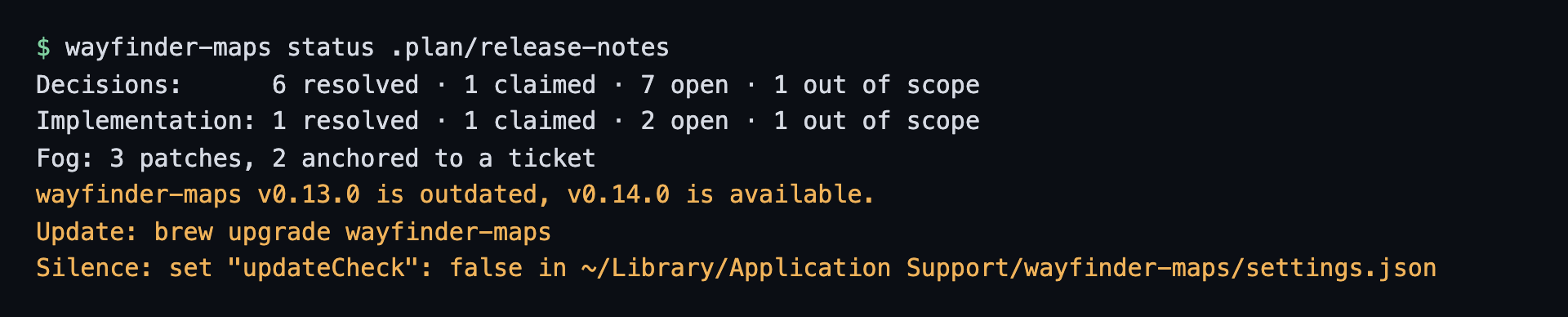
In the terminal
- The notice names the update command for the way you installed the binary:
wayfinder-maps self-updateforinstall.sh,brew upgrade wayfinder-mapsfor Homebrew,go install ...@latestforgo install, and the Releases page for a manual download. - A
devbuild never checks. - It goes to stderr, so piped or parsed stdout stays clean, and it never changes the command's exit code.
- It shows only when stderr is a terminal and
CIis unset, so agents callingstatusorlintstay quiet. self-updateand--versionskip it, they already say it.serveandappprint it as soon as the lookup finishes, since they run until you stop them.
How it checks
- It asks the same place as
self-update --check, soWAYFINDER_RELEASES_URLapplies. - The answer is cached for 24 hours in
latest-release.jsonin thewayfinder-mapsfolder of your user cache directory, shared by the CLI and the viewer. - Within the cache window there is no network call at all.
- A failed lookup (offline, rate limited) is silent and not retried for an hour.
- The lookup runs beside the command and times out after 2 seconds, so it never delays or changes the command's own result.
Silence it
The notice names the file to edit, so silencing it needs no docs:
Silence: set "updateCheck": false in ~/Library/Application Support/wayfinder-maps/settings.json
- Set
"updateCheck": falseinsettings.jsonin thewayfinder-mapsfolder of your user config directory (the notice prints the full path), or flip the Update check switch in the viewer's settings menu. - Either way it turns off both the check and the notice.
- If the file does not exist yet, create it with just
{"updateCheck": false}, missing keys keep their defaults.