Install
wayfinder-maps comes in two parts that install separately:
- the skills, which teach your agent the wayfinder method and write the map;
- the binary, which reads the map:
status,lint,pulland the star-map viewer.
Skill and binary are independent, each just reads the on-disk contract.
The quickest route to both is the install script plus install-skill.
Skills, as a Claude Code plugin
/plugin marketplace add RamsesKools/wayfinder-maps
/plugin install wayfinder-maps@wayfinder-maps
/wayfinder-maps then works in every project, and the map lands in that project's .plan/.
The plugin bundles wayfinder-maps plus the four skills it invokes by name: grill-me, research, prototype and domain-modeling.
All five were originally authored by Matt Pocock in mattpocock/skills; the copies under skills/ are MIT-licensed adaptations.
Skills, drop-in for any harness
Copy skills/ into your project and tell your agent to read skills/wayfinder-maps/SKILL.md and follow it; the skills it names live alongside.
You may include any of the extras under skills/.optional/ too, skills/README.md describes the full set.
Or let the binary write them for you, see Installing the skills.
The binary
Install script
One-liner for macOS and Linux (amd64 and arm64):
curl -fsSL https://raw.githubusercontent.com/RamsesKools/wayfinder-maps/main/scripts/install.sh | bash
It resolves the release, verifies the archive against checksums.txt, extracts it to ~/.local/share/wayfinder-maps/ (honours XDG_DATA_HOME) and symlinks the binary into ~/.local/bin/, so the double-clickable launchers stay next to the real binary.
~/.local/bin/
  wayfinder-maps          -> ~/.local/share/wayfinder-maps/wayfinder-maps
  wayfinder-maps-webview  -> ~/.local/share/wayfinder-maps/wayfinder-maps-webview  (Linux only)
~/.local/share/wayfinder-maps/
  wayfinder-maps
  wayfinder-maps-webview          (Linux only)
  wayfinder-app, wayfinder-web    (.command on macOS)
  .install.json                   receipt: version, commit, installed_at, asset, sha256
- Flags:
--version <tag>,--prefix <dir>,--bin-dir <dir>,--force. - Rerunning with the same version is a no-op.
<prefix>/.install.jsonrecords what was installed (version,commit,installed_at,asset,sha256), whichself-updatereads.
Pinned release
curl -fsSL https://raw.githubusercontent.com/RamsesKools/wayfinder-maps/main/scripts/install.sh | bash -s -- --version v0.5.1
By hand
Download an archive from Releases. No Go toolchain is needed, and the native window and folder dialog work on all three platforms:
- macOS uses WKWebView, part of the OS.
- Windows uses WebView2, which ships with Windows 10 and 11.
- The Linux archive bundles a small helper that binds the system webkit,
libwebkit2gtk-4.1. It is preinstalled on most desktops, otherwise runsudo apt install libwebkit2gtk-4.1-0.
status and lint need nothing installed at all, even headless.
The macOS and Linux archives also carry two double-clickable launchers, so no terminal is needed: wayfinder-app opens the native window and wayfinder-web starts the server and opens your browser (.command on macOS).
With Go
go install github.com/RamsesKools/wayfinder-maps/cmd/wayfinder-maps@latest
Check the version
wayfinder-maps --version prints the release version, and dev for a local build.
The Linux helper answers wayfinder-maps-webview --version the same way.
Installing the skills
Install is two steps: the binary, then the skills that match it.
curl -fsSL https://raw.githubusercontent.com/RamsesKools/wayfinder-maps/main/scripts/install.sh | bash
wayfinder-maps install-skill
The skills are embedded in the binary, so they always match what status and lint do.
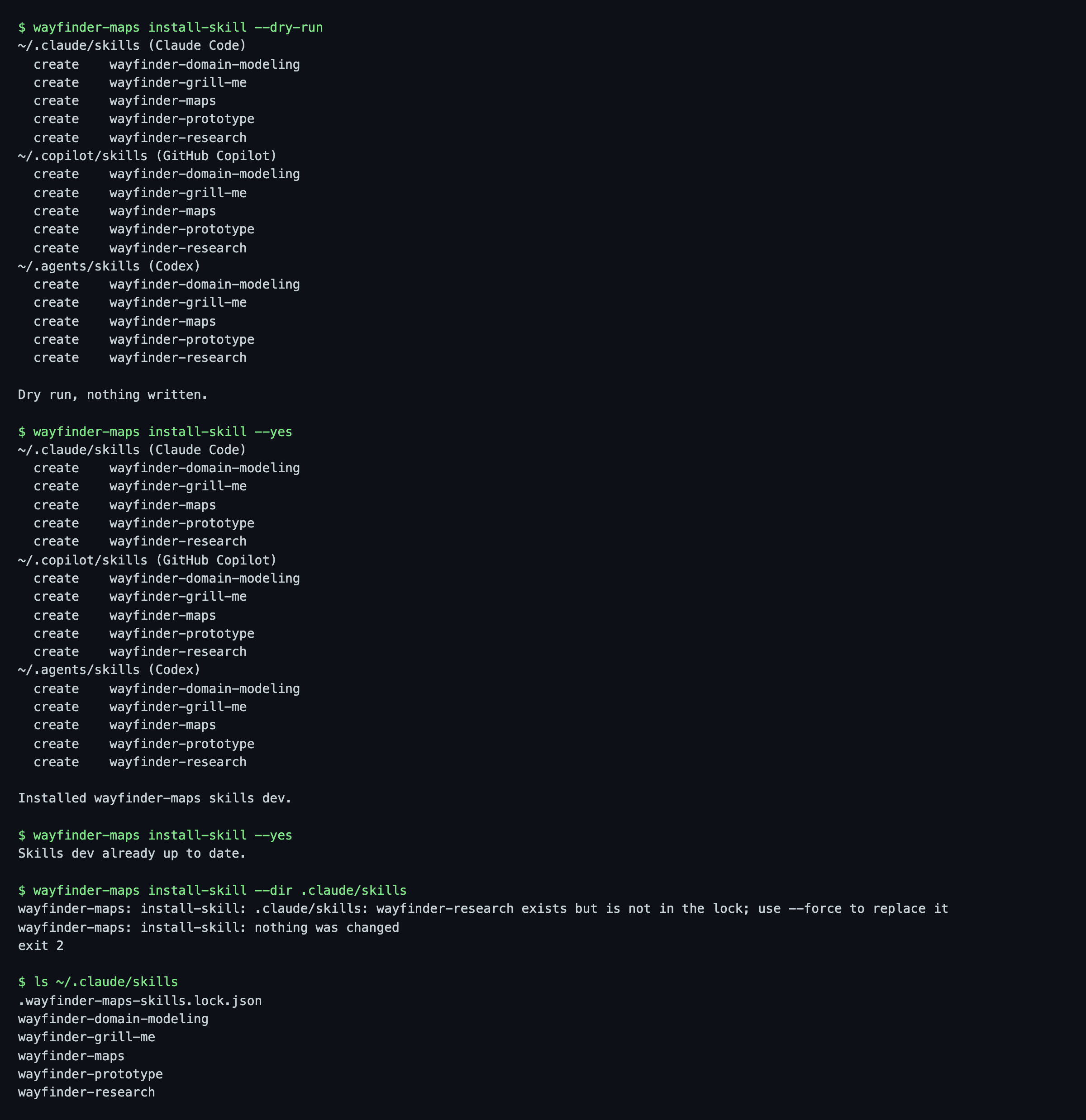
install-skill proposes the personal skills dir of each harness and asks per dir:
~/.claude/skills(Claude Code)~/.copilot/skills(GitHub Copilot)~/.agents/skills(Codex)
Dirs that resolve to the same place (a symlinked ~/.claude/skills, say) are installed once.
Copilot also reads the other two dirs, so declining its own dir avoids duplicates.
wayfinder-maps install-skill                        # ask per default dir
wayfinder-maps install-skill --yes                  # all default dirs, no questions (automation)
wayfinder-maps install-skill --dir .claude/skills   # project-local; repeatable, never asks
wayfinder-maps install-skill --only grill-me,research
wayfinder-maps install-skill --with-optional        # also the extras from skills/.optional/
wayfinder-maps install-skill --dry-run              # list what would change, write nothing
wayfinder-maps install-skill --force                # replace wayfinder dirs that are unmanaged or edited
- Without a terminal it needs
--yesor--dir, so a script never writes into your agent dirs by accident. - Skills install as
wayfinder-mapsandwayfinder-<name>(wayfinder-grill-me,wayfinder-research, ...), so they are recognisable in a dir listing and never clash with your owngrill-me. Cross-references inside the skills are rewritten to match. - Each dir gets
.wayfinder-maps-skills.lock.jsonwithversion,commit(when the binary has an install receipt),installed_atand a sha256 per file. Only skill dirs listed in it are managed; everything else in the dir is left alone. Commit it when you vendor the skills into a repo (--dir <repo>/skillsis the sync primitive). - Without
--forceit stops with exit 2 and changes nothing (in any dir) when a target skill dir exists but is not in the lock, or has files that differ from the lock. A clean upgrade replaces the dirs and drops files removed upstream. - Rerunning at the same version is a no-op.
- Each skill dir also carries the upstream MIT
LICENSE.
Updating the skills
A new release carries new embedded skills, so updating is the same two steps as installing:
wayfinder-maps self-update       # new binary, new embedded skills
wayfinder-maps install-skill     # skills dirs that follow the lock are upgraded in place
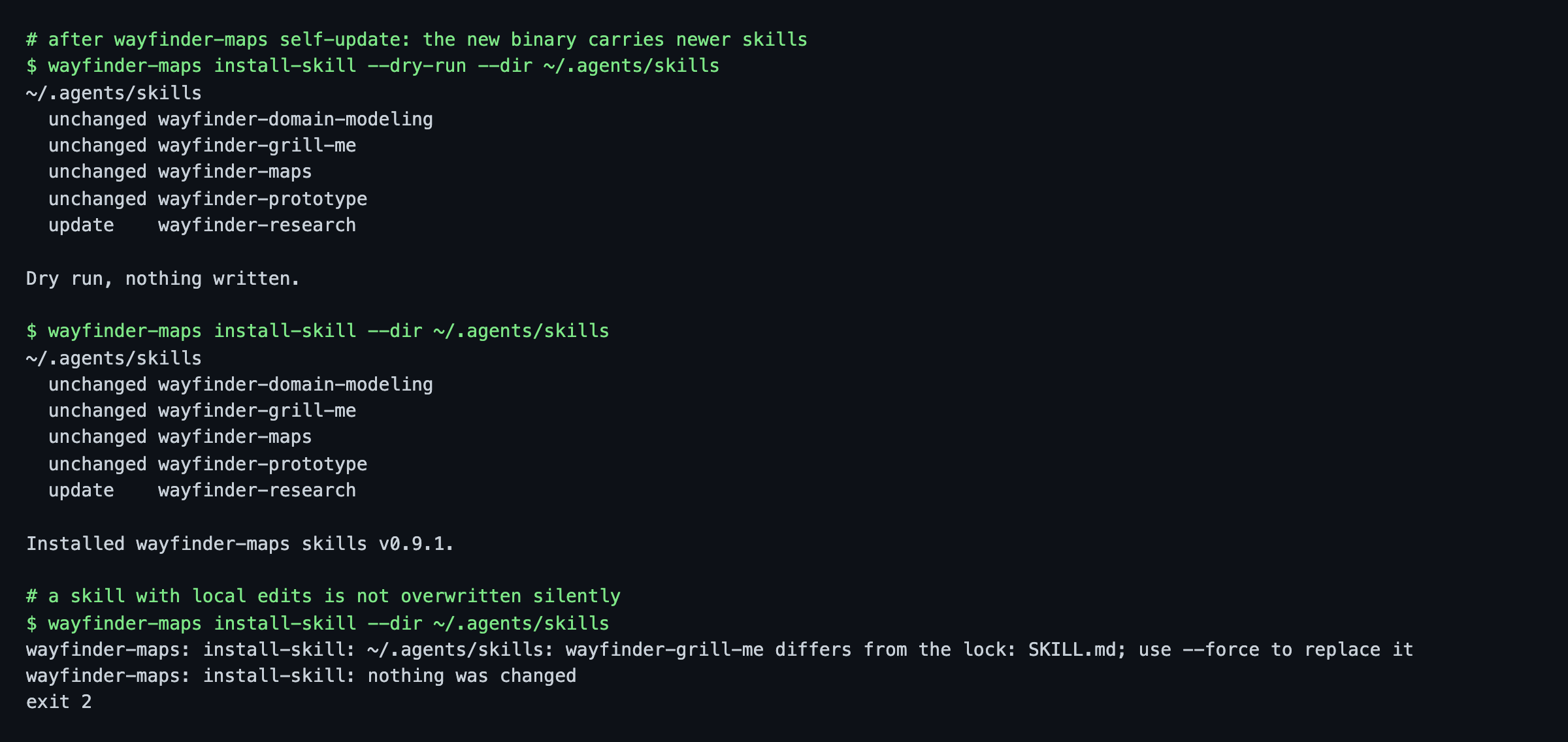
- Only skills whose content changed are shown as
update; the rest stayunchanged, and a dir with no changes is not rewritten. - An upgrade replaces the whole skill dir, so files removed upstream disappear, and the lock records the new
version. - A skill you edited locally (or a stray file in a managed skill dir) blocks the run with exit 2 and no changes in any dir. Re-run with
--forceto take upstream's version, or move your edits elsewhere first. - Use
--dry-runfirst to see which skills would change.
Updating the binary
A binary installed from a release by install.sh upgrades itself in place:
wayfinder-maps self-update                    # latest release
wayfinder-maps self-update --version v0.5.1   # pin or downgrade
wayfinder-maps self-update --check            # report only, exit 1 if behind
wayfinder-maps self-update --force            # reinstall the same version
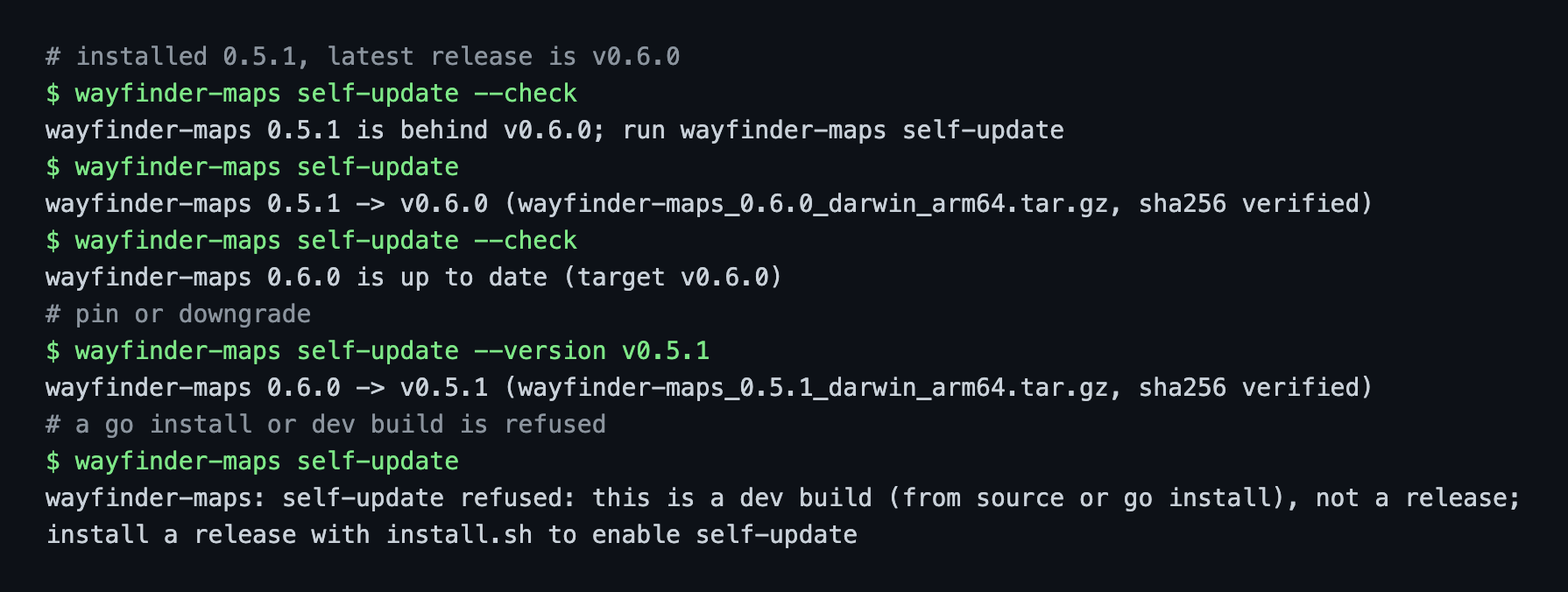
- It downloads the release archive and
checksums.txt, verifies the sha256, then renames each file over the old one. A runningserveorappkeeps its old binary until restarted. - It reads and rewrites
.install.jsonnext to the binary (same fields asinstall.shwrites), and refuses (exit 2, with the reason) for adevbuild, ago installbuild, or any binary without that receipt. - Windows is not supported yet.
WAYFINDER_RELEASES_URLandWAYFINDER_API_URLpoint it at another release host, the same overridesinstall.shhonours.
Outdated notice
When a newer release exists, commands end with a notice on stderr (terminal only, never in CI) naming the update command for how you installed the binary.
Setting "updateCheck": false in settings.json (or the Update check switch in the viewer) silences it, see Outdated notice.
Build from source
go build ./cmd/wayfinder-maps      # pure Go: status, lint, serve
go test ./...
node --test cmd/wayfinder-maps/webtests/*.test.mjs   # viewer layout and markdown tests
Release builds inject the version with -ldflags "-X github.com/RamsesKools/wayfinder-maps/internal/version.Version=<x.y.z>"; without it --version prints dev, or the tag for a go install ...@vX.Y.Z build.
The native window needs cgo on macOS (WKWebView); Windows is pure Go (WebView2).
On Linux the webkit linkage lives in a separate helper, ./cmd/wayfinder-maps-webview, built with libwebkit2gtk-4.1-dev and kept next to the main binary.
Releases are cut by the release workflow: CI builds the helper on Linux runners and GoReleaser packs everything.
To preview these docs, run uv run mkdocs serve from the repo root.